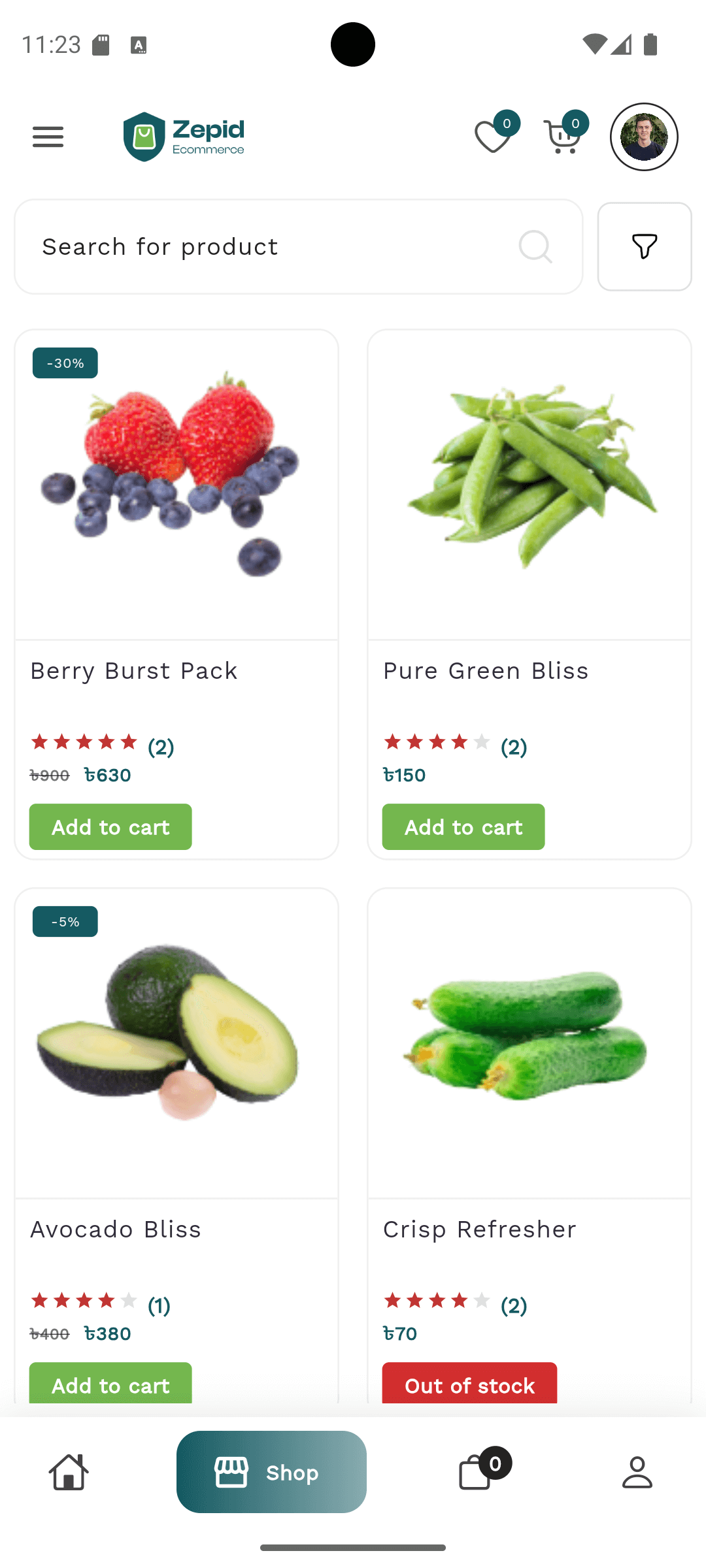
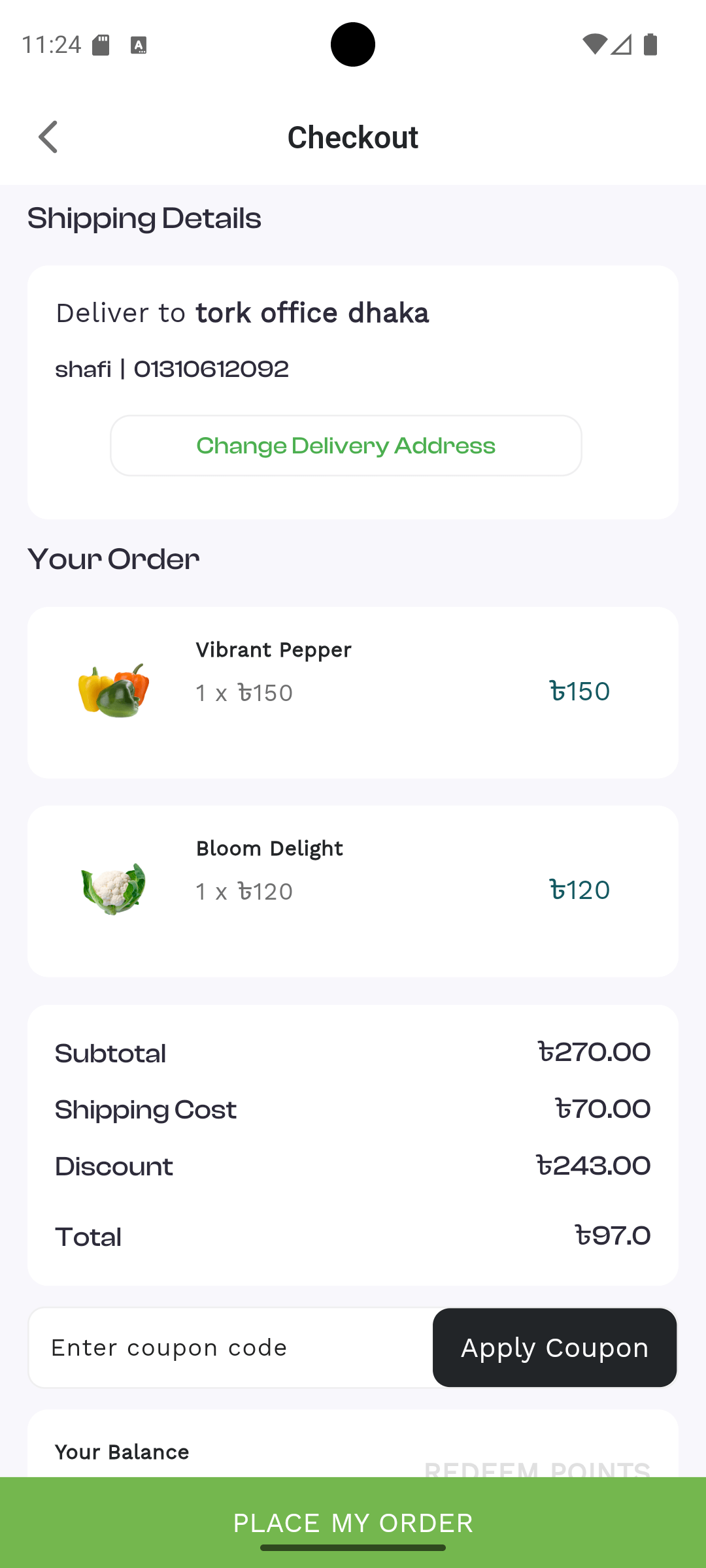
Zepid E-commerce is a powerful and flexible online retail platform designed for
merchants, suppliers, and customers. It supports end-to-end e-commerce operations including product
management, orders, stock management, payments, and marketing.
The system provides a complete suite of tools for administrators, suppliers, and customers to
manage products, track orders, process payments, and operate a modern e-commerce business
efficiently.
Role‑based access: Super Admin, Manager, Sales Executive
Android Mobile App
Flutter‑based synchronized mobile E-commerce app for Customers.
Frontend Website Overview
The Zepid E-commerce Frontend Website is the public-facing gateway for customers to
browse products,
compare items, manage orders, and complete secure purchases. The interface is optimized for
performance, mobile responsiveness,
and conversion-focused design—ensuring higher sales, user trust, and brand recognition.
Main Website Areas
Home Page – Dynamic banners, featured categories, trending products
Product Categories – Organized browsing with filters, sorting, and smart
grouping
Product Details Pages – Images, pricing, variations, reviews, delivery info
Blog – SEO-friendly articles to drive traffic and educate customers
Product Types
Physical Products (Electronics, Fashion, Home Appliances, Beauty, Grocery)
Digital Goods (E-books, Software Codes, Licenses)
Variants Support:
Size
Color
Weight
Custom Attributes
E-commerce Features & Highlights
Advanced Search & Auto Suggestions
Smart Filters (Price, Brand, Category, Ratings)
Wishlist & Save for Later
Delivery Area & Shipping Calculations
Customer Ratings & Reviews
Recommended Products
Secure Payment Gateways (Card, Mobile Banking, COD, Wallet)
Loyalty Points & Rewards
Trust & Conversion Elements
Secure Payment Badges
Customer Testimonials
Top Brands & Partner Logos
App Download Promotion (Android/iOS)
Newsletter & Offer Subscription
Footer Links
Industry-standard must-have footer links:
About Us
Contact
Shop
Categories
Offers
Blog
My Account
Track Order
Refund Policy
Shipping Policy
Terms & Conditions
Privacy Policy
Brand Vision Message
“Experience seamless shopping with Zepid E-commerce — fast, modern, and customer-first.”
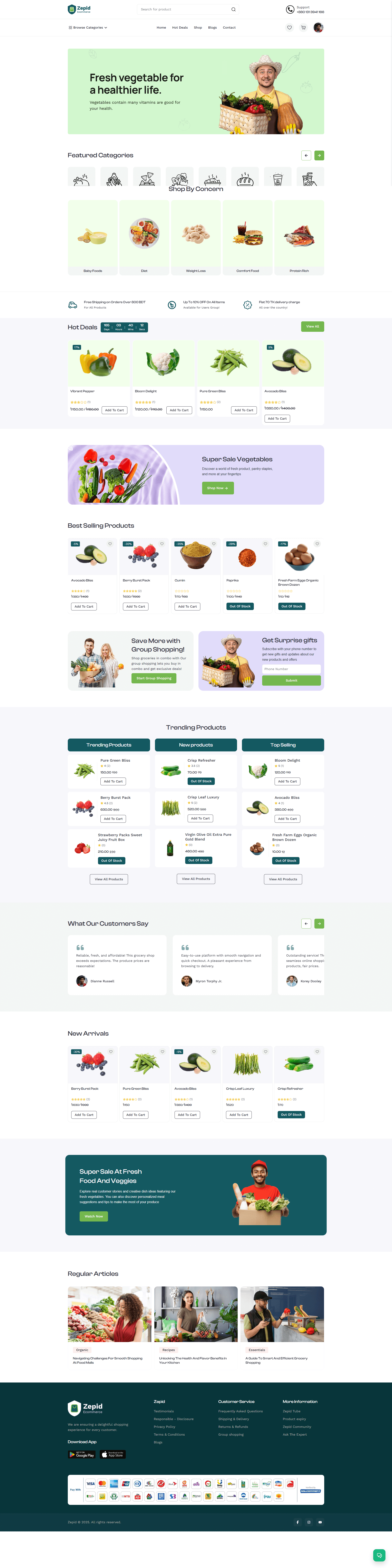
Frontend UI Preview
Below is a visual example of the website homepage layout:
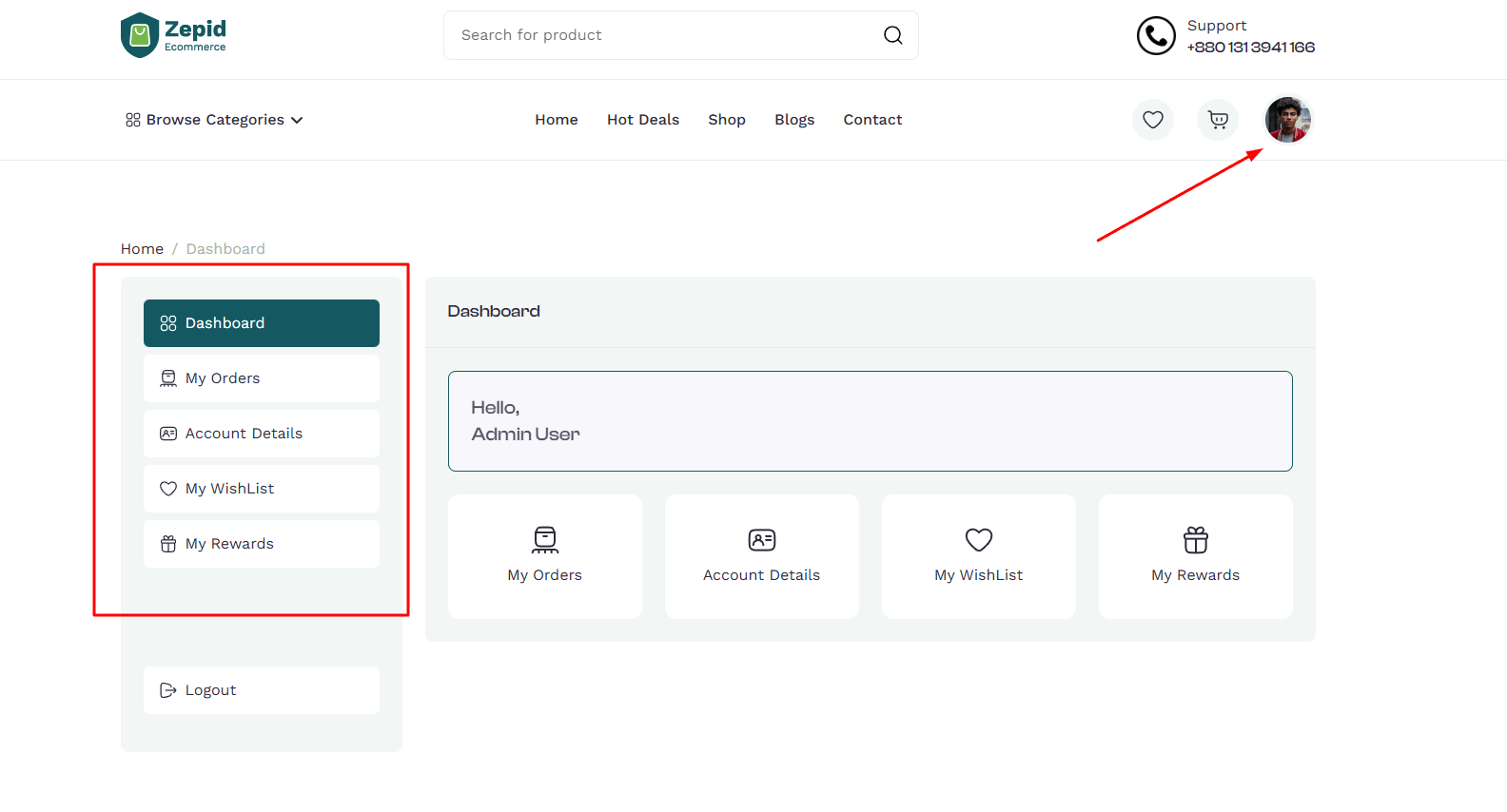
Customer Panel Overview
The Zepid E-commerce Customer Panel is a personalized dashboard where users can
manage their shopping activities, track orders, update profiles, view rewards, and access essential
account tools.
The interface is modern, intuitive, and optimized for a seamless shopping experience across all
devices.
Main Sections of Customer Panel
Dashboard – Quick snapshot of recent orders, notifications, and account
highlights.
My Orders – Complete order history with tracking, invoice download, and order
status updates.
Account Details – Manage personal information, login credentials, addresses,
and contact details.
My Wishlist – Save favorite products for future purchase and receive price-drop
alerts.
My Rewards – View earned points, available rewards, referral bonuses, and
redemption options.
Logout – Secure account sign-out.
Dashboard
The Dashboard provides a quick overview of the customer’s activity within the store.
It helps users monitor the most important information at a glance.
Recent Orders Overview
Pending Deliveries
Reward Points Summary
Notifications & Offers
Quick Access to Wishlist and Profile
My Orders
Customers can view and manage all their orders in one place. Each order includes full tracking and
timeline visibility.
Order ID & Invoice
Order Status (Pending, Processing, Shipped, Delivered, Cancelled)
Tracking Information
Product Details
Delivery Date Estimate
Return/Refund Request Option (if enabled)
Download Invoice
Account Details
In this section, customers can update personal and security-related information to keep their
account accurate and protected.
Profile Information (Name, Email, Phone)
Shipping Addresses
Billing Addresses
Password Change
Notification Preferences
My Wishlist
The wishlist allows customers to save products for later consideration. It also improves conversion
by reminding users
of items they are interested in.
Save Favorite Products
Move Items to Cart
Price Drop Alerts (if enabled)
Stock Availability Notifications
My Rewards
Zepid E-commerce includes a reward and loyalty system to increase customer engagement and repeat
purchases.
Total Earned Points
Available Reward Balance
Redemption History
Referral Bonuses & Codes
How to Earn More Points
Logout
A secure logout system ensures user account safety. After logging out, all sensitive session data is
safely cleared.
Zepid E-commerce — Admin Panel User Manual
This manual explains every admin menu, control, and workflow in the Zepid E-commerce Admin Panel.
Each section includes purpose, step-by-step actions, common tasks, and screenshots placeholders to
guide your team efficiently.
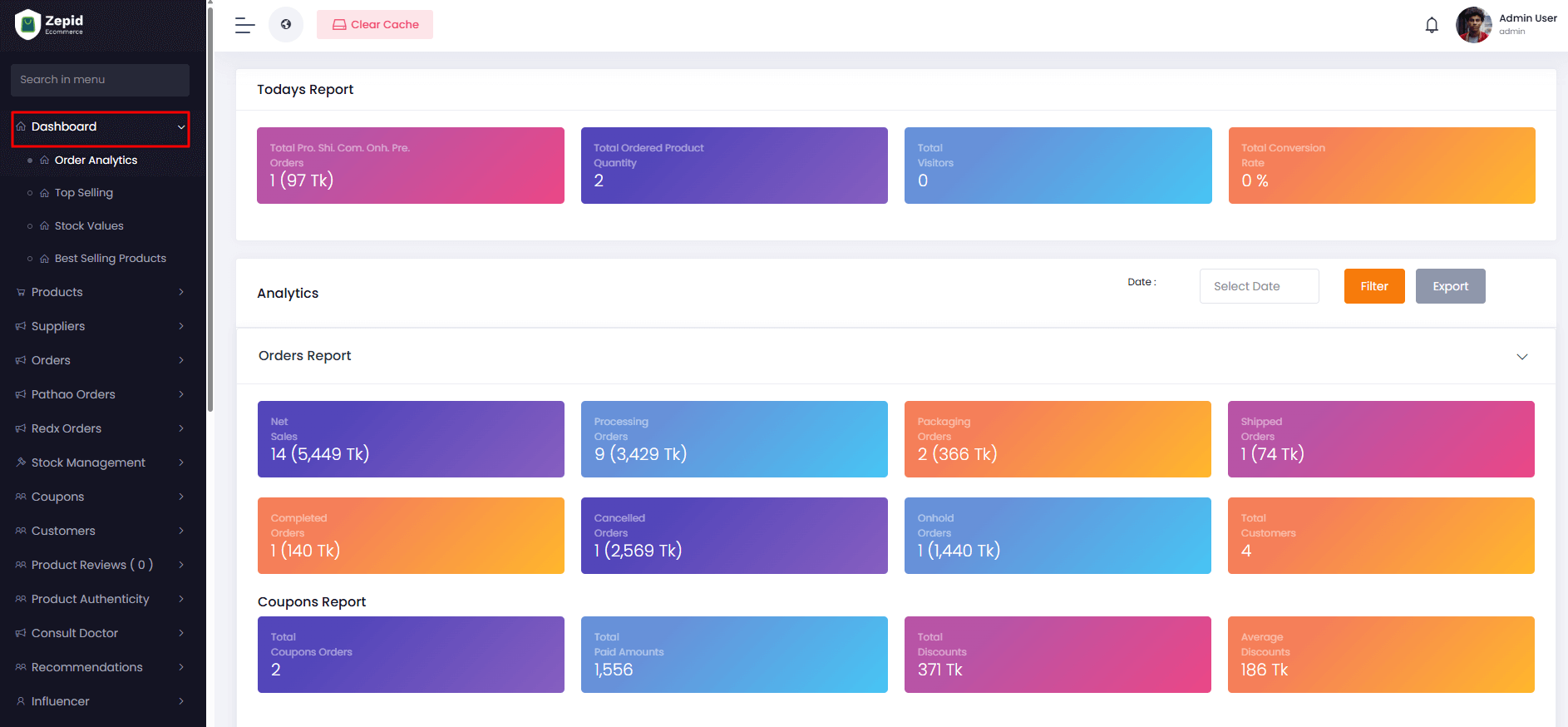
Dashboard
The Dashboard serves as the central hub for your e-commerce platform, giving you an at-a-glance
view of key metrics, trends, and operational insights. It helps admins quickly assess platform
health, monitor performance, and take data-driven decisions.
Order Analytics: Track daily, weekly, and monthly order trends. Analyze peak
hours, order volumes by category, and identify patterns for better inventory planning.
Top Selling Products: View the most popular products by revenue and quantity.
Helps prioritize marketing, restocking, and promotions.
Stock Values: Monitor total stock value across categories and suppliers to
avoid overstocking or stockouts.
Best Performing Categories: Identify categories driving revenue and focus on
expanding or promoting those product lines.
Recent Orders: Quick overview of the latest orders, including status, customer,
and fulfillment progress.
Pending Actions: Alerts for tasks like low stock, unprocessed orders, or
pending returns.
Products
Manage your entire product catalog efficiently, including product details, supplier information,
categories, and promotional events. Proper product management ensures accurate listings, improved
sales, and better customer experience.
Add New Product
Product Name & Description: Include key specifications, SEO-friendly titles, and descriptive
content for customers.
Price & Stock: Set retail prices, discount prices, and available stock quantities.
Brand & Category: Assign products to appropriate brands and categories for better navigation
and reporting.
Images & Media: Upload high-quality images, videos, and product manuals for a better shopping
experience.
Supplier Assignment: Link products to suppliers for easy stock tracking and accountability.
Attributes & Variants: Define product options like size, color, and variants for flexible
inventory management.
All Products
Filter & Search: Filter by category, brand, stock status, or supplier.
Bulk Actions: Edit, enable/disable, or delete multiple products at once.
Quick View: Preview product details without leaving the page.
Export & Reports: Generate reports for inventory, sales, and performance metrics.
All Supplier Products
Supplier Tracking: Monitor which products come from which supplier.
Verification: Ensure products meet quality standards before publishing live.
Stock Updates: Automatically sync supplier stock with platform inventory.
Category & Brand Management
Category: Add, edit, or delete product categories to improve navigation.
Brand: Manage brands and associate them with products.
Brand Category: Assign brands to categories for reporting and filtering.
Events: Create promotional events, discounts, or seasonal campaigns.
Product Verification: Ensure supplier products meet platform standards before publishing.
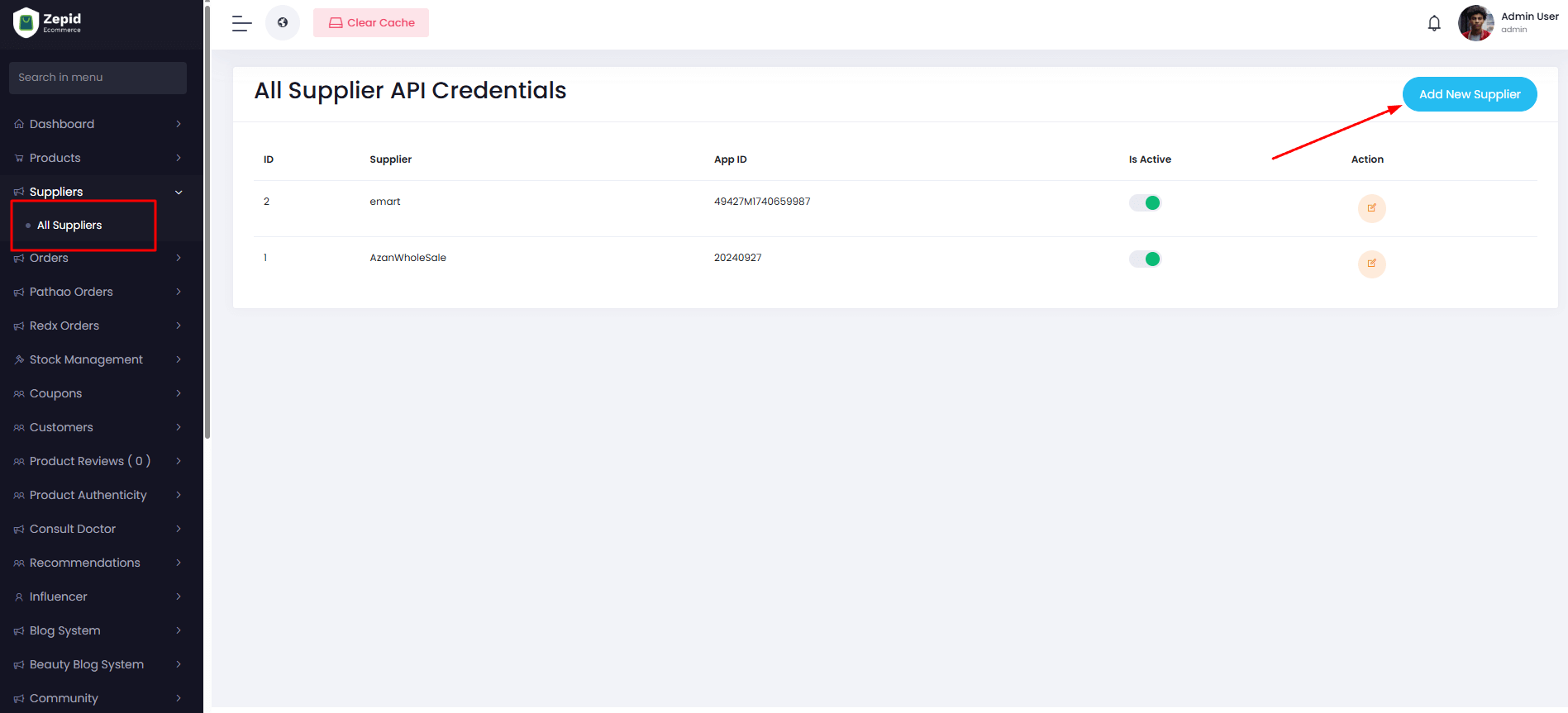
Suppliers
Suppliers are key to inventory management. Efficient supplier management ensures timely restocking,
product quality, and accountability.
All Suppliers: View suppliers with contact details, assigned products, and performance metrics.
Add Supplier: Create a new supplier profile with relevant information.
Edit Supplier: Update supplier details or products associated.
Supplier Performance: Track delivery times, stock reliability, and order accuracy.
Supplier Communication: Integrated contact info for quick communication.
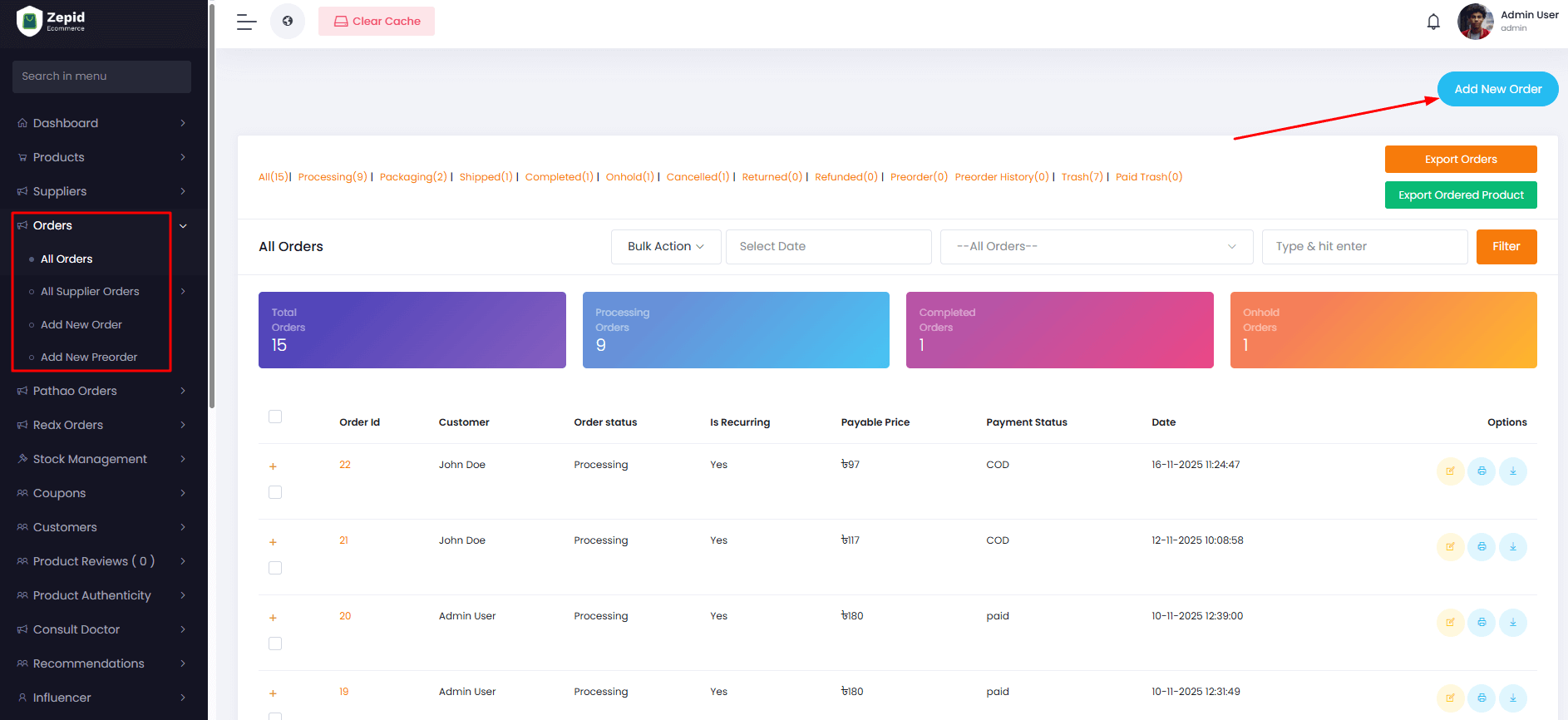
Orders
Centralized order management helps track every customer order, monitor fulfillment, and ensure
timely deliveries.
All Orders: Full list of customer orders with status, payment, and shipment details.
All Supplier Orders: Track orders placed to suppliers separately to avoid stock issues.
Add New Order / Preorder: Create manual orders for special cases or offline sales.
Order Status: Update order progress (pending, processing, shipped, delivered, returned).
Invoice & Receipts: Generate order invoices, packing slips, and receipts for accounting.
Refunds & Returns: Manage returned items and issue refunds systematically.
Pathao Orders
Manage all shipments via Pathao logistics. Keep track of deliveries and ensure customer
satisfaction.
Scan Orders: Verify and track Pathao orders using order number or QR code.
Shipment Status: Monitor delivery status, pending deliveries, and completed orders.
Reports: Generate daily or weekly Pathao delivery reports for accountability.
Redx Orders
Similar to Pathao, Redx logistics orders can be tracked and managed efficiently.
Scan Redx Orders: Verify incoming and outgoing shipments.
Delivery Status: Track delivery progress, issues, and exceptions.
Reports: Generate Redx shipment reports for performance tracking.
Stock Management
Maintain accurate inventory to avoid stockouts, overstocking, or discrepancies. Stock management
integrates supplier stock and platform stock seamlessly.
All Stocks: View all products' stock levels across categories.
Supplier Stocks: Monitor stock provided by each supplier.
Low Stock Alerts: Automatic notifications when product stock reaches the minimum threshold.
All Requested Stocks: Approve or reject stock requests from suppliers or internal departments.
Stock Adjustment: Manual adjustments for damaged, returned, or misplaced items.
Coupons
Create and manage discount campaigns for products, categories, or events to boost sales and
customer engagement.
All Coupons: View active, expired, or upcoming coupons.
All Spinner Coupons: Special promotional coupons tied to events or gamification.
Add New Coupon: Set discount type (percentage or fixed), validity, applicable
products/categories, and usage limits.
Coupon Reports: Track coupon usage, redemption rates, and campaign performance.
Customers
Manage all registered customers, their purchase history, engagement, and reward points.
Customer List: View all users with registration info, purchase activity, and status
(active/inactive).
User Point History: Track loyalty points earned and redeemed for each customer.
Surprise Subscribers: Identify and manage special campaigns for selected users.
User Lists & Import: Bulk upload users from CSV or Excel files, manage lists for marketing.
Customer Segmentation: Group customers by purchase behavior, demographics, or engagement for
targeted campaigns.
Product Reviews
Manage all customer feedback and reviews on products. Helps in monitoring product performance and
customer satisfaction.
All Reviews: View all submitted reviews, including ratings, comments, customer
details, and product info.
Add New Review: Manually add a review to any product, useful for testing or
importing feedback.
Moderation: Approve or reject reviews to maintain quality and prevent spam.
Analytics: Analyze review trends to understand customer preferences and improve
product offerings.
Product Authenticity
Verify and maintain authenticity records for products to ensure customer trust and brand integrity.
All Reviews: Monitor submitted authenticity reviews for verification purposes.
Add New Review: Add authenticity feedback manually after quality checks.
Verification Status: Track products’ authenticity status (verified, pending,
rejected).
Reports: Generate authenticity reports for audits or supplier assessments.
Consult Doctor
Manage all doctor consultations, patient appointments, and doctor payments efficiently.
All Appointments: View all scheduled consultations with patient details,
date/time, and status.
Add New Appointment: Schedule new consultations manually, assign doctor, and
set consultation type.
All Doctors: List all registered doctors, including specializations,
availability, and ratings.
Add New Doctor: Register new doctors with professional credentials and service
details.
Doctor Payments: Track payments, commissions, or consultation fees for doctors.
Appointment Reports: Generate detailed reports to monitor doctor workload and
consultation trends.
Recommendations
Manage personalized product or service recommendations for users to improve engagement and sales.
All Recommendations: View all suggested items for customers with details on
target users and conditions.
All Answers: Manage answers or feedback associated with recommendations to
refine suggestions.
Recommendation Settings: Configure rules, triggers, or algorithms for automatic
recommendations.
Analytics: Track effectiveness and conversion rates of recommendations.
Influencer
Manage influencers who promote products, track campaigns, and analyze marketing performance.
All Influencers: View all registered influencers, profiles, contact info, and
campaigns.
Add New Influencer: Register new influencers and assign them to campaigns or
products.
Add Products: Link products to influencers for promotions or affiliate
programs.
Campaign Tracking: Monitor influencer reach, engagement, and conversions.
Reports: Generate performance reports for influencers to evaluate ROI.
Blog System
Manage website blog content, including posts, categories, comments, and navigation menus to boost
SEO and engagement.
All Posts: List all blog posts with author, status, publish date, and
engagement metrics.
Categories: Organize blog posts into categories for better navigation and
search.
Comments: Moderate blog comments to prevent spam and engage users.
Add New Comment: Manually add blog comments for testing or special promotions.
Blog Page Menu Bar: Configure menu bar links, featured posts, or categories for
the blog page.
SEO & Metadata: Add meta titles, descriptions, and tags for each post to
improve search visibility.
Beauty Blog System
A dedicated section for beauty-related blog content, including posts, categories, and user
interactions.
All Posts: View all beauty blog posts with author, publish date, and engagement
metrics.
Categories: Manage categories specifically for beauty content for better
navigation.
Comments: Moderate user comments to maintain quality discussions.
Add New Comment: Add manual comments for editorial purposes or promotions.
Beauty-Blog Page Menu Bar: Configure navigation menus for the beauty blog
section.
Featured Posts: Highlight top-performing or editor-recommended beauty posts.
Community
Manage user-generated content in the community section, including posts, discussions, and
moderation.
All Posts: List all user-submitted posts, including text, images, and
engagement metrics.
Moderation: Approve or reject posts to maintain quality and platform safety.
Reporting: Track reported posts and take necessary actions for compliance.
Community Engagement: Encourage user interactions with likes, comments, and
shares.
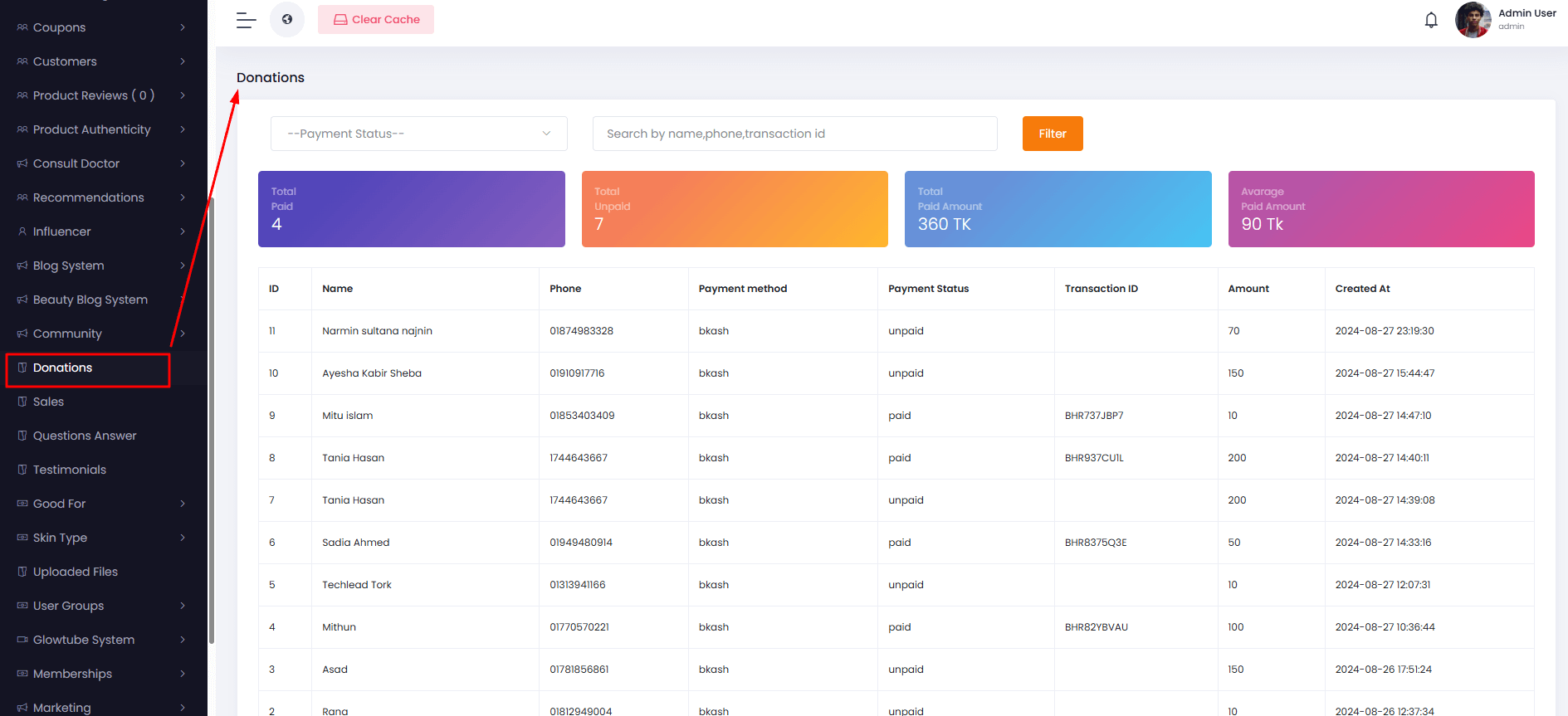
Donations
Manage all donation records, track campaigns, and monitor donor activity to ensure transparency and
reporting accuracy.
All Donations: View a detailed list of donations made by users, including donor
information, amounts, dates, and status.
Donation Reports: Generate reports by campaign, date range, or donor for
financial tracking.
Donation Campaigns: Create and manage donation drives or campaigns, set goals,
and track progress.
Sales
Monitor and manage all sales activity, ensuring accurate reporting and insights into business
performance.
Sales Reports: Generate detailed sales reports filtered by date, product,
supplier, or category.
Sales Analytics: Analyze trends, revenue growth, and product performance for
strategic decisions.
Top Selling Products: Identify best-performing products to optimize stock and
marketing.
Sales Forecast: Project future sales based on historical data.
Questions & Answers
Manage the Q&A section where users can ask questions about products or services, ensuring timely
responses.
All Questions: View all user-submitted questions, along with status and
assigned staff or experts.
Answer Questions: Provide direct responses or assign to relevant personnel for
resolution.
Question Analytics: Track frequently asked questions to improve product
information or FAQs.
Moderation: Approve, edit, or remove inappropriate questions.
Testimonials
Manage customer testimonials to build credibility and display positive feedback on the website.
All Testimonials: View, approve, or reject submitted testimonials, including
text, images, or videos.
Add New Testimonial: Manually add new testimonials for marketing purposes.
Featured Testimonials: Highlight selected testimonials on the homepage or
product pages.
Good For
Manage product tags that indicate suitability for specific concerns, preferences, or customer
groups.
All GoodFors: View, edit, or delete existing tags related to product
suitability.
Add New GoodFor: Create new tags for categories such as skin concerns, age
groups, or specific needs.
Tag Analytics: Track usage frequency and product association to refine
marketing strategies.
Skin Type
Classify products according to skin types to help users find suitable products easily.
All SkinTypes: View all skin type classifications associated with products.
Add New SkinType: Add new categories for products targeting specific skin
types.
Skin Type Assignment: Link products to relevant skin type categories for better
recommendations.
Uploaded Files
Manage all files uploaded to the platform, including product images, PDFs, videos, and other media.
All Files: View, download, or delete uploaded files with metadata and usage
references.
File Organization: Categorize files by type, purpose, or related products.
File Upload: Add new files manually or via bulk import.
User Groups
Create and manage user groups for targeted campaigns, notifications, or access control.
All Groups: View all existing user groups and their members.
Add New Group: Create new user groups and assign users with specific access or
campaign privileges.
Group Analytics: Track group engagement and effectiveness in campaigns.
Glowtube System
Manage video content including playlists and posts within the Glowtube section.
Glowtube Playlists: Create and manage curated video playlists for users.
All Posts: View, edit, or delete all posts submitted to the Glowtube system.
Content Scheduling: Schedule posts or playlists for publishing at specific
times.
Engagement Tracking: Monitor likes, views, and comments for each post.
Memberships
Manage platform memberships, tiers, benefits, and pricing for customers.
All Membership: View existing membership plans with details on users, benefits,
and validity.
Add New Membership: Create new membership tiers with pricing, duration, and
perks.
Membership Analytics: Track subscription trends and revenue contribution per
plan.
Marketing
Manage email campaigns, newsletters, and subscriber lists to improve engagement and retention.
Subscribers: View all subscribers, manage preferences, and segment users for
campaigns.
Email Campaigns: Create, schedule, and monitor marketing emails.
Analytics: Track open rates, click rates, and campaign effectiveness.
Shipping
Manage shipping zones, countries, districts, and delivery areas for accurate logistics.
Shipping Countries: Configure countries where shipping is available and set
defaults.
Shipping Districts: Manage districts within countries for precise delivery.
Shipping Areas: Define specific areas and zones for delivery coverage.
Shipping Charges: Set delivery charges per area or weight for accurate billing.
Setup & Configurations
Configure platform settings, business rules, app notifications, integrations, and homepage layout.
Business Settings: Set company details, tax settings, and operational
preferences.
General Settings: Configure default platform behaviors and user preferences.
Homepage Settings: Manage homepage layout, featured sections, and sliders.
App Notification Settings: Configure push notifications for mobile app users.
Social Media Settings: Connect and manage social accounts for sharing and
login.
SMTP Setting: Set up email server credentials for notifications and alerts.
Payment Method: Configure payment gateways and transaction options.
Sliders: Manage homepage sliders and banners for promotions.
FAQs: Add or edit frequently asked questions to assist users.
Popups: Create and manage popups for announcements, campaigns, or promotions.
Staffs
Manage platform staff, their roles, and access permissions.
All Staffs: View all staff members, roles, and activity status.
Staff Permissions: Assign roles, manage permissions, and define access control
levels.
Staff Activity: Monitor staff actions and contributions within the platform.
API Credential
Manage API credentials for integration with third-party systems or mobile apps.
All Credentials: View all active and expired API credentials.
Add New Credential: Generate new credentials for system integration.
Access Control: Define API permissions and restrict access as needed.
Activity Logs
Track all user and staff actions on the platform for auditing and accountability.
All Logs: View a detailed history of actions including date, time, user, and
description.
Filter Logs: Search by user, activity type, or date range.
Export Logs: Export activity logs for audit or compliance purposes.
Mobile App Installation
The Zepid E-commerce Mobile App is designed for seamless and enjoyable shopping
experiences. To get started:
Visit the Google Play Store (Android) or Apple App Store
(iOS).
Search for "Zepid E-commerce" and tap Install.
If your device doesn’t support the store, download the APK file directly from
the website.
Once installed, open the app and grant necessary permissions (notifications, location, camera
for barcode scanning).
After installation, you can start browsing products, placing orders, tracking deliveries, and
managing your account.
Login / Signup
Access your account securely or create a new account in a few steps:
Phone Number Login: Receive an OTP to quickly login without a password.
Email Login: Use your registered email and password.
Social Login: Login with Google or Apple ID for convenience.
Once logged in, you can:
View and manage your orders
Save favorite products in Wishlist
Earn and redeem reward points
Manage your profile and account settings
Dashboard
The dashboard is the main hub of the app, giving users a complete overview at a glance:
Quick Access Tiles: Access your orders, cart, and wishlist in one tap.
Product Recommendations: Personalized based on your browsing and purchase
history.
Flash Deals & Promotions: Highlighted for immediate access.
Order Summary: Overview of active and recent orders.
Rewards Overview: Quick insight into earned points and upcoming offers.
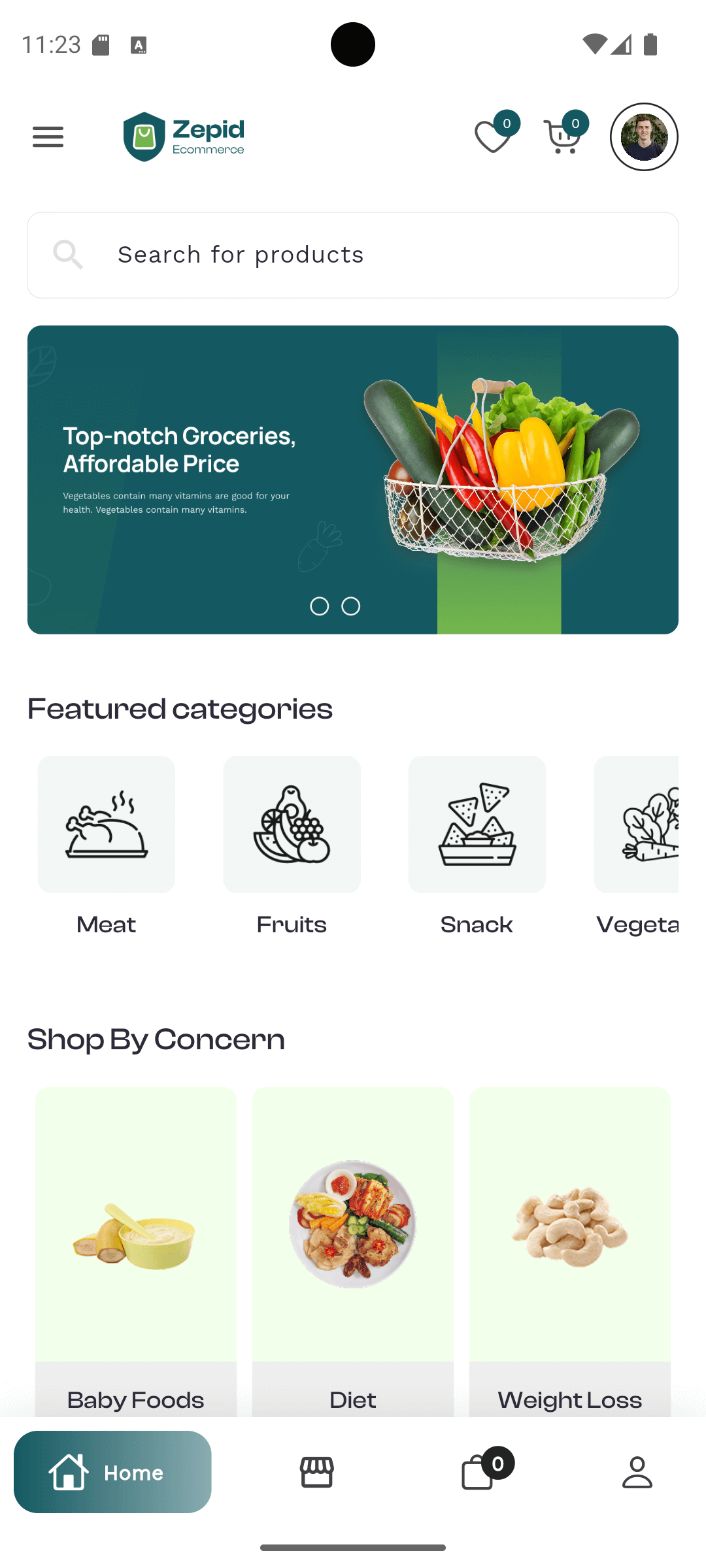
Home
The Home screen is designed to make discovering products easy and enjoyable:
Featured products and top sellers.
Categories to browse products quickly.
Seasonal promotions and banners for sales events.
Search bar for quick product lookup.
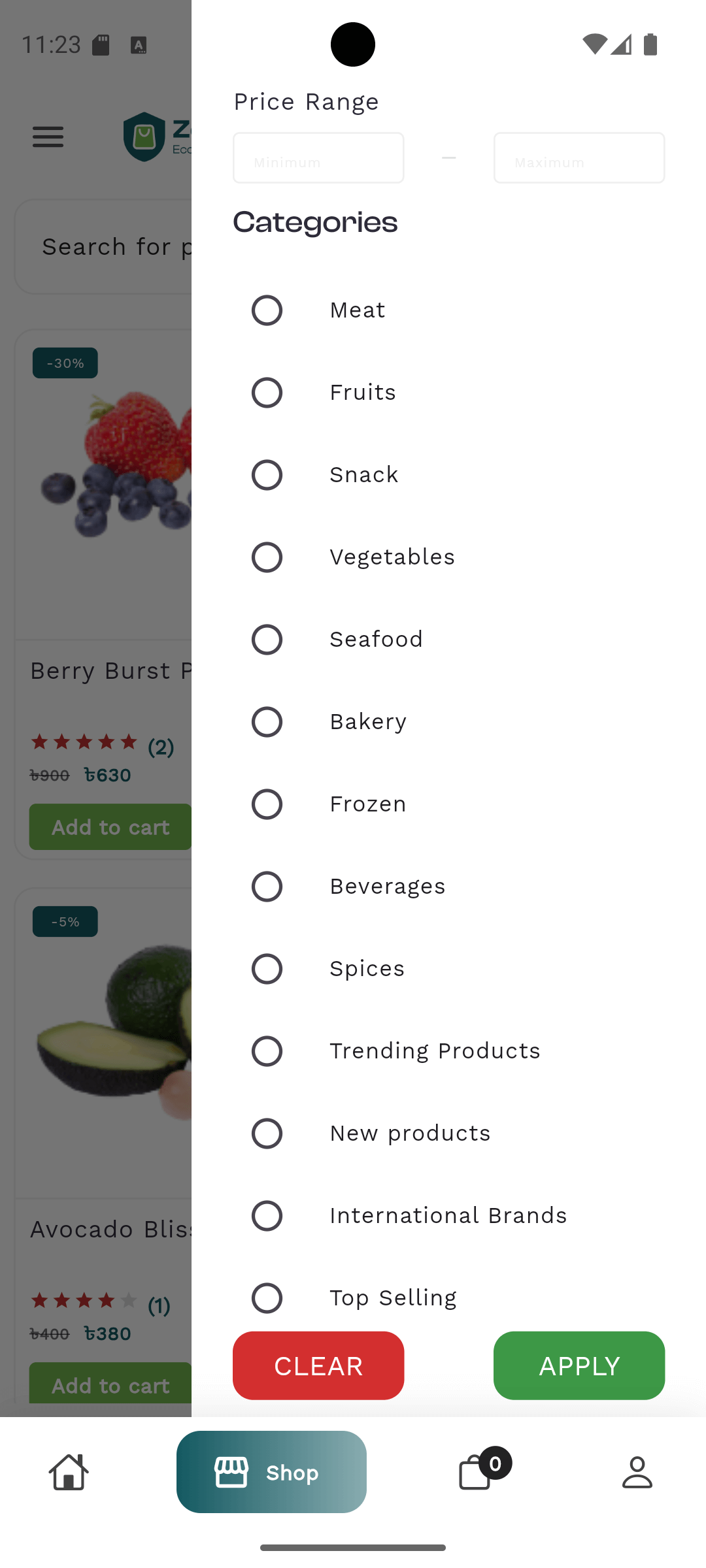
Shop
Explore all products with multiple ways to filter and sort:
Browse by categories, subcategories, or brands.
Use filters like price, rating, availability, and new arrivals.
Sort products by popularity, price, or newest.
See trending or recommended products based on your activity.
Product Details
Each product page provides all the information needed to make an informed purchase:
High-resolution images with zoom and swipe.
Full description, specifications, and available variants (size, color, etc.).
Pricing, discounts, and stock availability.
User reviews and ratings.
Related product suggestions to discover alternatives.
Cart
Manage products before checkout:
Review selected products and quantities.
Apply promo codes or discounts.
Check estimated delivery fees.
Remove or save products for later.
Checkout
Complete your order securely with multiple payment options:
Cash on Delivery (COD).
Credit/Debit Card Payments.
Digital Wallets or App Wallet.
Redeem reward points or apply gift vouchers.
Confirm delivery address and order summary before payment.
My Orders
Track and manage all your orders in one place:
View order history with timeline and current status.
Track delivery in real-time.
Cancel orders if within allowed time frame.
Reorder previous items quickly.
Download invoices and receipts.
Request returns or refunds if eligible.
Wishlist
Save products you love for later or to compare options:
Mark favorite products for easy access.
Get notifications on price drops and back-in-stock items.
Move items from wishlist to cart easily.
Profile & Account Settings
Manage personal information and app settings conveniently:
Edit name, email, phone, and profile photo.
Manage shipping addresses.
Change password or update security settings.
View saved cards and payment methods (if enabled).
Logout from the app securely.
Notifications
The notification center keeps users updated on important activities:
Order status updates and shipping alerts.
Promotional offers and discounts.
Flash sale alerts and event notifications.
Reward points earned and loyalty updates.
System messages and announcements.
Rewards & Loyalty Points
Earn points and redeem them easily to enjoy discounts and special offers:
Earn points on every order placed.
Referral bonuses for inviting friends.
View total points and activity history.
Redeem points at checkout for discounts.
Check reward history to track usage and expiry.
Support
Get help whenever needed:
Access FAQs and help topics.
Contact customer support via chat or email.
Report issues or provide feedback.
Features Overview
The Zepid E-commerce app offers a comprehensive set of features tailored to different user roles,
ensuring a smooth and productive shopping and management experience.
Customer Features
Designed to make shopping fast, secure, and enjoyable:
Browse & Shop Products: Explore thousands of products, filter by categories,
brands, and trending items.
Secure Checkout: Multiple payment options including COD, credit/debit cards,
and digital wallets.
Order Tracking: Real-time updates from order placement to delivery.
Wishlist: Save favorite products for future purchases or price tracking.
Profile Management: Update personal information, addresses, and payment
methods.
Notifications & Alerts: Receive order updates, promotional offers, flash sales,
and reward announcements.
Loyalty & Rewards: Earn and redeem points for purchases, referrals, and special
offers.
Support Access: Contact customer service, view FAQs, and resolve issues easily.
Seller Features
Empowering sellers to manage products, orders, and customer interactions:
Product Management: Add, edit, or remove products with detailed descriptions,
pricing, and images.
Order Management: Track incoming orders, update statuses, and handle returns or
refunds.
The Zepid E-commerce system is designed with role-based access control to ensure security,
accountability,
and efficient operation. Each user role has specific permissions and responsibilities.
Role
Access Level
Description / Key Responsibilities
Super Admin
Full Access
Can manage all aspects of the system including user roles, permissions, site configuration,
product catalog, reports, and overall platform settings.
Admin
High Access
Manages daily operations such as approving products, handling customer issues, processing
payments,
monitoring sales, and generating reports.
Manager
Moderate Access
Oversees specific departments or teams, manages sales, inventory, and ensures operational
targets are met.
Responsible for system maintenance, bug fixes, code updates, integration with APIs, and
deployment.
Note: Access levels are strictly enforced to protect sensitive data and ensure smooth
operations.
Each role can only perform actions assigned to it unless granted higher privileges.